With the release of Solr 4.3 we’ve got a long awaited feature – we can now split shards of collections that were already created and have data (in SolrCloud type deployment). In this entry we would like to try that feature and see how it works. So let’s do it.
A few words before we try
Choosing the right amount of shard a collection should be built of is one of those variables that needs to be known before the final deployment. After our collection was created we couldn’t change the number of shard, we were only able to add more replicas. Of course that came with consequences – if we’ve chosen the number of shards wrong we could end up with too low shards count and the only way to go was creating a new collection with the proper amount of shard and re-index our data. With the release of Apache Solr 4.3 we are now able to split shards of our collections.
Small cluster
In order to test the new shard split functionality I decided to run a small and simple cluster containing a single Solr instance with the embedded ZooKeeper and use the example collection provided with Solr. In order to achieve that I’ve run the following command:
java -Dbootstrap_confdir=./solr/collection1/conf -Dcollection.configName=collection1 -DzkRun -DnumShards=1 -DmaxShardsPerNode=2 -DreplicationFactor=1 -jar start.jar
After launching the mini cluster its view was as follows:

Test data
As usual we need some data for tests and I decided to use the example data provided with Solr. In order to index them I’ve run the following command in the exampledocs directory:
java -jar post.jar *.xml
The number of indexed documents were checked with the following command:
curl 'http://localhost:8983/solr/collection1/select?q=*:*&rows=0'
The response returned by Solr was as follows:
<?xml version="1.0" encoding="UTF-8"?>
<response>
<lst name="responseHeader">
  <int name="status">0</int>
  <int name="QTime">5</int>
  <lst name="params">
    <str name="q">*:*</str>
    <str name="rows">0</str>
  </lst>
</lst>
<result name="response" numFound="32" start="0">
</result>
</response>
As you can see we’ve got 32 documents in our collection.
Shard split
So now let’s try to divide the single shard our collection is built of. In order to do that we will use Collections API and a new – SPLITSHARD action. In its simplest form it takes two parameters – collection which is the collection name we want to divide and the shard which is the name of the shard we want to split. So in our case, the command that will split the shard looks like this:
curl 'http://localhost:8983/solr/admin/collections?action=SPLITSHARD&collection=collection1&shard=shard1'
If everything run without a problem, after a few seconds we will get response form Solr that indicates the end of the process. The response will look more or less like this:
<?xml version="1.0" encoding="UTF-8"?>
<response>
<lst name="responseHeader">
  <int name="status">0</int>
  <int name="QTime">9220</int>
</lst>
<lst name="success">
  <lst>
    <lst name="responseHeader">
      <int name="status">0</int>
      <int name="QTime">6963</int>
    </lst>
    <str name="core">collection1_shard1_1_replica1</str>
    <str name="saved">/home/solr/4.3/solr/solr.xml</str>
  </lst>
  <lst>
    <lst name="responseHeader">
      <int name="status">0</int>
      <int name="QTime">6977</int>
    </lst>
    <str name="core">collection1_shard1_0_replica1</str>
    <str name="saved">/home/solr/4.3/solr/solr.xml</str>
  </lst>
  <lst>
    <lst name="responseHeader">
      <int name="status">0</int>
      <int name="QTime">9005</int>
    </lst>
  </lst>
  <lst>
    <lst name="responseHeader">
      <int name="status">0</int>
      <int name="QTime">9006</int>
    </lst>
  </lst>
  <lst>
    <lst name="responseHeader">
      <int name="status">0</int>
      <int name="QTime">103</int>
    </lst>
  </lst>
  <lst>
    <lst name="responseHeader">
      <int name="status">0</int>
      <int name="QTime">1</int>
    </lst>
    <str name="core">collection1_shard1_1_replica1</str>
    <str name="status">EMPTY_BUFFER</str>
  </lst>
  <lst>
    <lst name="responseHeader">
      <int name="status">0</int>
      <int name="QTime">1</int>
    </lst>
    <str name="core">collection1_shard1_0_replica1</str>
    <str name="status">EMPTY_BUFFER</str>
  </lst>
</lst>
</response>
Cluster after the split
After the split our cluster view will look like this:
 As we can see we have two new shards. In theory each of the new shards should contain a portion of documents from the original shard1 – some of the documents should be placed in shard1_1 and some in shard1_0. Again using Solr administration panel we can check each of the cores (which are the actual shards):
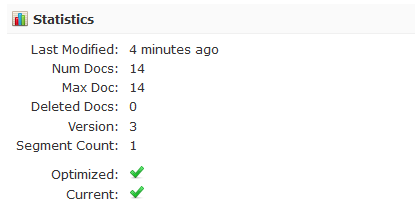
Shard1_1
Statistics for shard with the name of Shard1_1 are as follows:
Shard1_0
And the statistics for shard with the name of Shard1_0 are as follows:
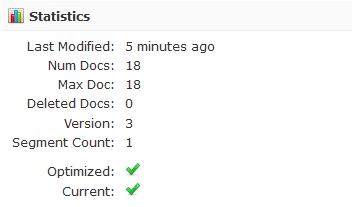
As you can see we have 32 documents in total, which is the same as in the original collection.
Cleaning up
I’ve left the cleaning up for the end. First of all in order to see the data in new shards we need to run the commit command against our collection. For example, this can be done by using the following command:
curl 'http://localhost:8983/solr/collection1/update' --data-binary '<commit/>' -H 'Content-type:application/xml'
In addition to that we can also remove the original shard, for example by using Solr administration panel or by using the CoreAPI.
Final test
As a summary I decided to test if the documents are available in the shards created by the SPLITSHARD action. In order to do that I’ve used the following command:
curl 'http://localhost:8983/solr/collection1/select?q=*:*&rows=100&fl=id,[shard]&indent=true'
And Solr responded in the following way:
<?xml version="1.0" encoding="UTF-8"?>
<response>
<lst name="responseHeader">
  <int name="status">0</int>
  <int name="QTime">7</int>
  <lst name="params">
    <str name="fl">id,[shard]</str>
    <str name="q">*:*</str>
    <str name="rows">100</str>
  </lst>
</lst>
<result name="response" numFound="32" start="0" maxScore="1.0">
  <doc>
    <str name="id">GB18030TEST</str>
    <str name="[shard]">192.168.56.1:8983/solr/collection1_shard1_0_replica1/</str></doc>
  <doc>
    <str name="id">IW-02</str>
    <str name="[shard]">192.168.56.1:8983/solr/collection1_shard1_0_replica1/</str></doc>
  <doc>
    <str name="id">MA147LL/A</str>
    <str name="[shard]">192.168.56.1:8983/solr/collection1_shard1_0_replica1/</str></doc>
  <doc>
    <str name="id">adata</str>
    <str name="[shard]">192.168.56.1:8983/solr/collection1_shard1_0_replica1/</str></doc>
  <doc>
    <str name="id">asus</str>
    <str name="[shard]">192.168.56.1:8983/solr/collection1_shard1_0_replica1/</str></doc>
  <doc>
    <str name="id">belkin</str>
    <str name="[shard]">192.168.56.1:8983/solr/collection1_shard1_0_replica1/</str></doc>
  <doc>
    <str name="id">maxtor</str>
    <str name="[shard]">192.168.56.1:8983/solr/collection1_shard1_0_replica1/</str></doc>
  <doc>
    <str name="id">TWINX2048-3200PRO</str>
    <str name="[shard]">192.168.56.1:8983/solr/collection1_shard1_0_replica1/</str></doc>
  <doc>
    <str name="id">VS1GB400C3</str>
    <str name="[shard]">192.168.56.1:8983/solr/collection1_shard1_0_replica1/</str></doc>
  <doc>
    <str name="id">VDBDB1A16</str>
    <str name="[shard]">192.168.56.1:8983/solr/collection1_shard1_0_replica1/</str></doc>
  <doc>
    <str name="id">USD</str>
    <str name="[shard]">192.168.56.1:8983/solr/collection1_shard1_0_replica1/</str></doc>
  <doc>
    <str name="id">GBP</str>
    <str name="[shard]">192.168.56.1:8983/solr/collection1_shard1_0_replica1/</str></doc>
  <doc>
    <str name="id">3007WFP</str>
    <str name="[shard]">192.168.56.1:8983/solr/collection1_shard1_0_replica1/</str></doc>
  <doc>
    <str name="id">EN7800GTX/2DHTV/256M</str>
    <str name="[shard]">192.168.56.1:8983/solr/collection1_shard1_0_replica1/</str></doc>
  <doc>
    <str name="id">SP2514N</str>
    <str name="[shard]">192.168.56.1:8983/solr/collection1_shard1_1_replica1/</str></doc>
  <doc>
    <str name="id">6H500F0</str>
    <str name="[shard]">192.168.56.1:8983/solr/collection1_shard1_1_replica1/</str></doc>
  <doc>
    <str name="id">F8V7067-APL-KIT</str>
    <str name="[shard]">192.168.56.1:8983/solr/collection1_shard1_1_replica1/</str></doc>
  <doc>
    <str name="id">apple</str>
    <str name="[shard]">192.168.56.1:8983/solr/collection1_shard1_1_replica1/</str></doc>
  <doc>
    <str name="id">ati</str>
    <str name="[shard]">192.168.56.1:8983/solr/collection1_shard1_1_replica1/</str></doc>
  <doc>
    <str name="id">canon</str>
    <str name="[shard]">192.168.56.1:8983/solr/collection1_shard1_1_replica1/</str></doc>
  <doc>
    <str name="id">corsair</str>
    <str name="[shard]">192.168.56.1:8983/solr/collection1_shard1_1_replica1/</str></doc>
  <doc>
    <str name="id">dell</str>
    <str name="[shard]">192.168.56.1:8983/solr/collection1_shard1_1_replica1/</str></doc>
  <doc>
    <str name="id">samsung</str>
    <str name="[shard]">192.168.56.1:8983/solr/collection1_shard1_1_replica1/</str></doc>
  <doc>
    <str name="id">viewsonic</str>
    <str name="[shard]">192.168.56.1:8983/solr/collection1_shard1_1_replica1/</str></doc>
  <doc>
    <str name="id">EUR</str>
    <str name="[shard]">192.168.56.1:8983/solr/collection1_shard1_1_replica1/</str></doc>
  <doc>
    <str name="id">NOK</str>
    <str name="[shard]">192.168.56.1:8983/solr/collection1_shard1_1_replica1/</str></doc>
  <doc>
    <str name="id">VA902B</str>
    <str name="[shard]">192.168.56.1:8983/solr/collection1_shard1_1_replica1/</str></doc>
  <doc>
    <str name="id">0579B002</str>
    <str name="[shard]">192.168.56.1:8983/solr/collection1_shard1_1_replica1/</str></doc>
  <doc>
    <str name="id">9885A004</str>
    <str name="[shard]">192.168.56.1:8983/solr/collection1_shard1_1_replica1/</str></doc>
  <doc>
    <str name="id">SOLR1000</str>
    <str name="[shard]">192.168.56.1:8983/solr/collection1_shard1_1_replica1/</str></doc>
  <doc>
    <str name="id">UTF8TEST</str>
    <str name="[shard]">192.168.56.1:8983/solr/collection1_shard1_1_replica1/</str></doc>
  <doc>
    <str name="id">100-435805</str>
    <str name="[shard]">192.168.56.1:8983/solr/collection1_shard1_1_replica1/</str></doc>
</result>
</response>
As you can see documents came from both shard, which is again what we expected. Please remember that this is only a sample usage and we will get back to shard split topic for sure.