We would like to discuss another new feature that will be a part of upcoming Solr 4.1 – the ability to place more than one shard of a given collection on a single Solr instance. As you may know this is not possible currently. So, lets look how this works by comparing Solr 4.1 to 4.0.
In order to illustrate how this feature works I decided to see how the process of creating a new collection looks like. We will use a single Solr instance and our collection with be built of two shards.
Solr 4.0
Solr.xml
What we need to do first is clean the solr.xml file, so it doesn’t have any information about cores. Of course we should do that if we migrate from the earlier Solr version.
Starting Solr
Now we need to run a single Solr instance with embedded ZooKeeper. We do that, by running the following command:
java -DzkRun -jar start.jar
Preparing configuration
Before creating our collection we need to send all the needed configuration file to ZooKeeper. Assuming that we have Solr installed in /home/solrpl/solr/ directory and that we have our configuration files stored in /home/solrpl/configs/collection1/conf directory I run the following script that is distributed with Solr 4.0:
/home/solrpl/solr/cloud-scripts/zkcli.sh -cmd upconfig -zkhost localhost:9983 -confdir /home/solrpl/configs/collection1/conf/ -confname collection1
Creating the collection
We should have our configuration files stored in ZooKeeper so now we can use the collections API to create our collection. In order to do the we run a query to Solr to the /solr/admin/collections endpoint with the action=CREATE parameter that tells Solr that we want to create new collection. We also need to provide the name of the collection by adding the name=collection1 parameter. In addition to that we inform Solr that we want to have our collection divided into two shards (numShard=2) and we don’t want any replicas (replicationFactor=0). So the full request looks like this:
curl 'http://localhost:8983/solr/admin/collections?action=CREATE&name=collection1&numShards=2&replicationFactor=0'
Solr administration panel view
If you would repeat the above steps and look at the cloud view in Solr administration panel you would see something like this:

Comments
As you can see Solr 4.0 didn’t place both shards on a single machine. The shard named shard1 was placed on the xubuntu-virtual node, but the one called shard2 was not assigned. Of course that would change if we had more nodes forming the cluster, but that’s not the point of this entry.
Solr 4.1
Solr.xml
Similar to what we did with Solr 4.0 we start with cleaning the solr.xml file. Of course we should do that if we migrate from the earlier Solr version.
Starting Solr
We do exactly the same when starting Solr 4.1, so we run the following command:
java -DzkRun -jar start.jar
Preparing configuration
Similar to what we did with Solr 4.0, we need to send our configuration to ZooKeeper. We do that by running exactly the same command as we did before:
/home/solrpl/solr/cloud-scripts/zkcli.sh -cmd upconfig -zkhost localhost:9983 -confdir /home/solrpl/configs/collection1/conf/ -confname collection1
Collection creation
Creating our collection will be a bit different this time. We send the same values of parameters like action, collection and numShards. However we add a new parameter the maxShardsPerNode one that specifies the maximum number of shards that can be placed on a single Solr instance (by default this value is set to 1). In our case we want to have two shards on a single Solr node so we set this parameter to 2. In addition to that Solr forces us to have at least a single replica, so we need to set the replicationFactor parameter to 1. The whole query looks like this:
curl 'http://localhost:8983/solr/admin/collections?action=CREATE&name=collection1&numShards=2&replicationFactor=1&maxShardsPerNode=2'
Solr administration panel view
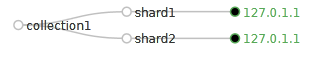
After all the above steps the cloud view in Solr administration panel looks like this:
Comments
As you can see, with Solr 4.1 we were able to create collection built of two shards and place both of them on a single Solr node. So if you need to have this kind of functionality you can wait for Solr 4.1 and be sure that it will be working.